
Future Gen Sponsors NADPOP Event in Baguio, Philippines

Business Process Outsourcing Provider
Data Collection, Preparation, Analytics, Secure Network Management, Contact Center Services,Back Office Processing
In today’s digital landscape, where cyber threats continue to proliferate, ensuring robust security measures is crucial for businesses of all sizes. Cybersecurity operations play a pivotal role in safeguarding sensitive data, mitigating risks, and protecting against potential breaches.
While many organizations focus on implementing firewalls, encryption, and other security measures, one vital but often overlooked step in comprehensive cyber defense is network monitoring. In this article, we delve into the importance of network monitoring in cyber security operations and how it can significantly enhance your organization’s overall security posture.
Understanding Network Monitoring
Network monitoring involves the continuous surveillance of a computer network to identify and respond to security threats, performance issues, and other network-related problems. It provides valuable insights into the overall health, performance, and security of your network infrastructure. By leveraging advanced monitoring tools and technologies, organizations can gain real-time visibility into network activities, identify anomalies, and respond promptly to potential security breaches.
The Vital Role of Network Monitoring in Cyber Security Operations
Best Practices for Effective Network Monitoring
To harness the full potential of network monitoring, organizations should consider the following best practices:
In today’s digital age, where online interactions have become an integral part of our daily lives, ensuring the security of your website has never been more crucial. Cyber threats and attacks are on the rise, putting sensitive data, user privacy, and even business reputation at risk. As a leading provider of website security solutions, we understand the importance of safeguarding your online presence. In this article, we delve into the realm of website security, offering valuable insights and practical steps to help you fortify your website against potential vulnerabilities and outrank other websites in Google search results.
Cybercriminals are becoming increasingly sophisticated in their methods, constantly seeking new ways to exploit weaknesses in websites. From data breaches and malware infections to hacking attempts and distributed denial-of-service (DDoS) attacks, the threat landscape is diverse and ever-evolving. It is imperative for website owners to adopt a proactive approach to protect their digital assets.
Before we delve into effective security strategies, it is essential to understand the common vulnerabilities that can be exploited by malicious actors. By gaining insights into these weak points, you can take appropriate measures to mitigate potential risks. Here are a few noteworthy vulnerabilities:
Running outdated versions of content management systems (CMS) or using obsolete plugins can open doors for cyber attackers. These outdated components often have known vulnerabilities that can be easily exploited.
Weak passwords, default login credentials, or lack of two-factor authentication (2FA) can leave your website susceptible to brute-force attacks or unauthorized access attempts.
Failure to implement secure communication protocols, such as SSL/TLS, can expose sensitive data to eavesdropping or interception by malicious individuals.
XSS attacks occur when an attacker injects malicious code into a website, which then gets executed by unsuspecting users’ browsers, potentially compromising their data or exposing them to further attacks.
SQL injection attacks exploit vulnerabilities in web applications that do not properly validate user input. Attackers can manipulate database queries, potentially gaining unauthorized access to sensitive information or modifying data.
To outrank other websites and establish your online presence as a reliable and secure destination, it is crucial to implement robust security measures. Below, we outline key strategies that will help safeguard your website:
Keeping your CMS, plugins, and other software components up to date is paramount. Developers frequently release security patches and bug fixes to address vulnerabilities. Staying current with these updates is vital to ensure your website remains secure.
Implementing strong passwords, enforcing password complexity rules, and encouraging the use of 2FA significantly enhance your website’s security posture. By adding an additional layer of verification, you mitigate the risk of unauthorized access.
Securing your website with SSL/TLS certificates ensures that data transmitted between your users and the server remains encrypted and cannot be easily intercepted or tampered with. This fosters trust among visitors and can positively impact your search engine rankings.
Deploying a WAF helps protect your website against common vulnerabilities, such as XSS and SQL injection. It acts as a shield, analyzing incoming traffic and filtering out potentially malicious requests, ensuring the integrity of your website’s data.
Utilize robust security monitoring tools to detect and respond to potential threats in real-time. Implementing intrusion detection systems (IDS)
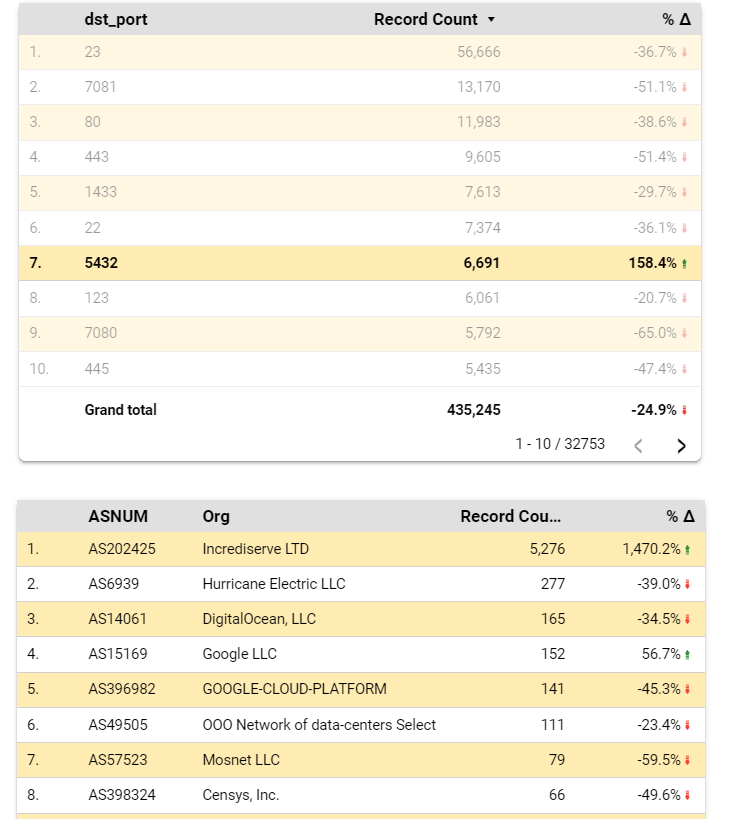
Watchdog dashboard shows that for the last 7 days ended Nov 6, 2022, attacks using port 5432 have increased by 158% (as seen below). We have sent abuse alerts to the top networks where the attacks came from. In the chart below: Incrediserve LTD network is the most prolific source of attacks (5276 incidents representing a 1,470% increase over the prior 7 days).
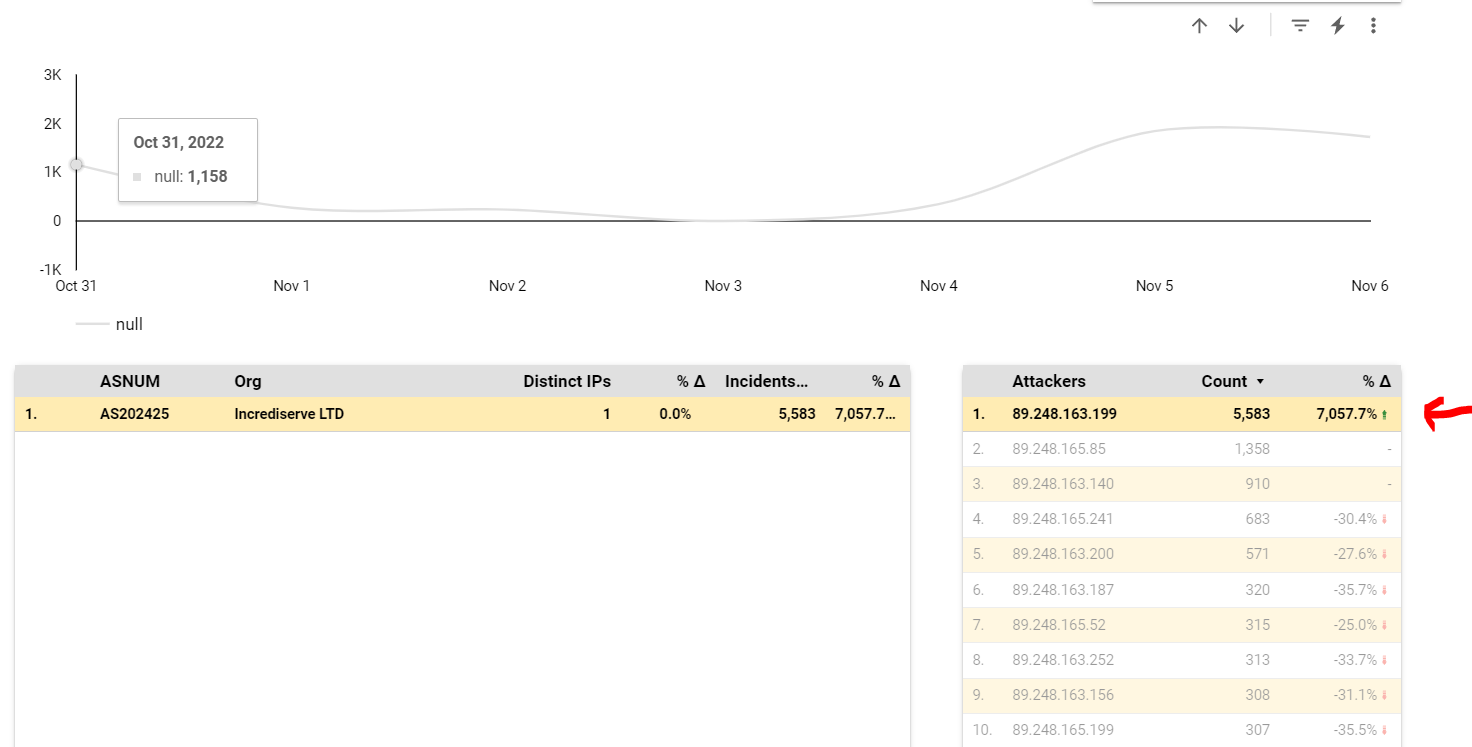
We quickly identify the rogue source IP from Incrediserve LTD using Port 5432: (In this case: 89.248.163.199). We also note the increase in attacks by this IP over the last 7 days.
What exploits are on port 5432 ?
A quick check over at SANS Internet Storm center shows that this port is associated with PostGres database server. Apple also uses this for ARD 2.0 Database.
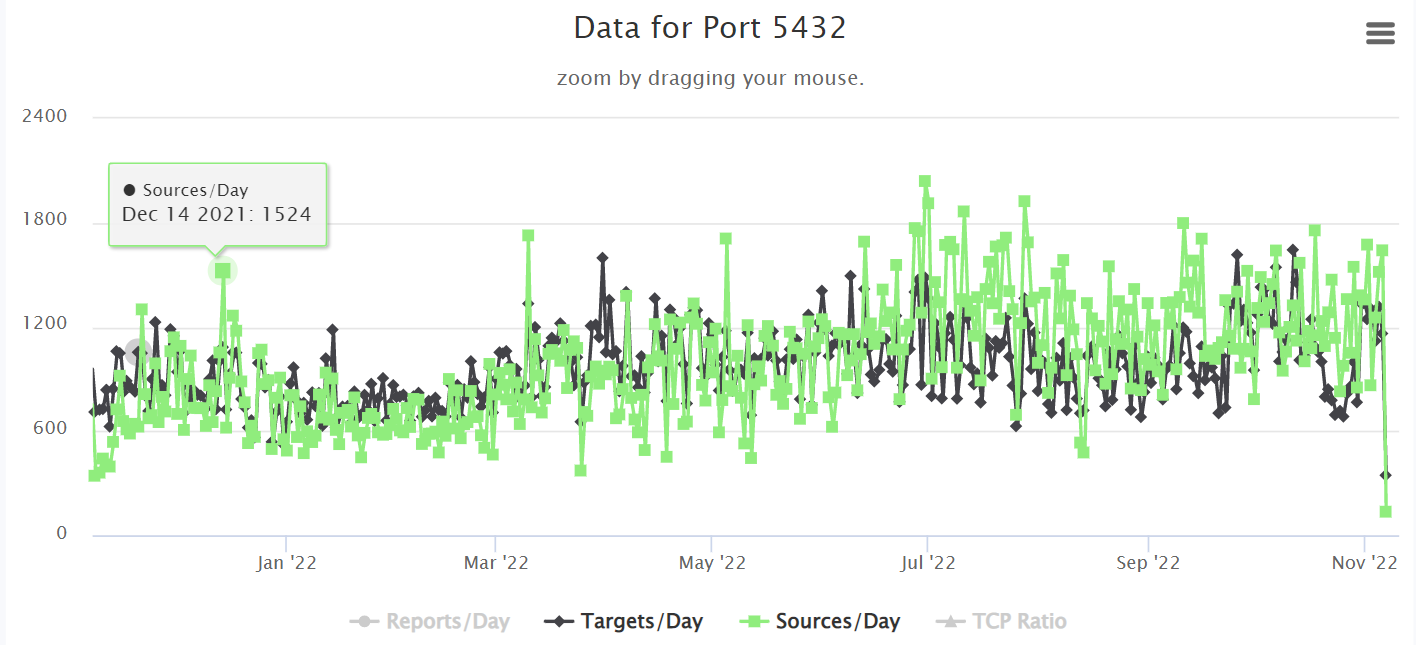
When we compare our dashboard results with worldwide stats, there is a slight increase in world wide attacks on PostGres. This typically means that there are exploitable vulnerabilities that may or may not be patched:
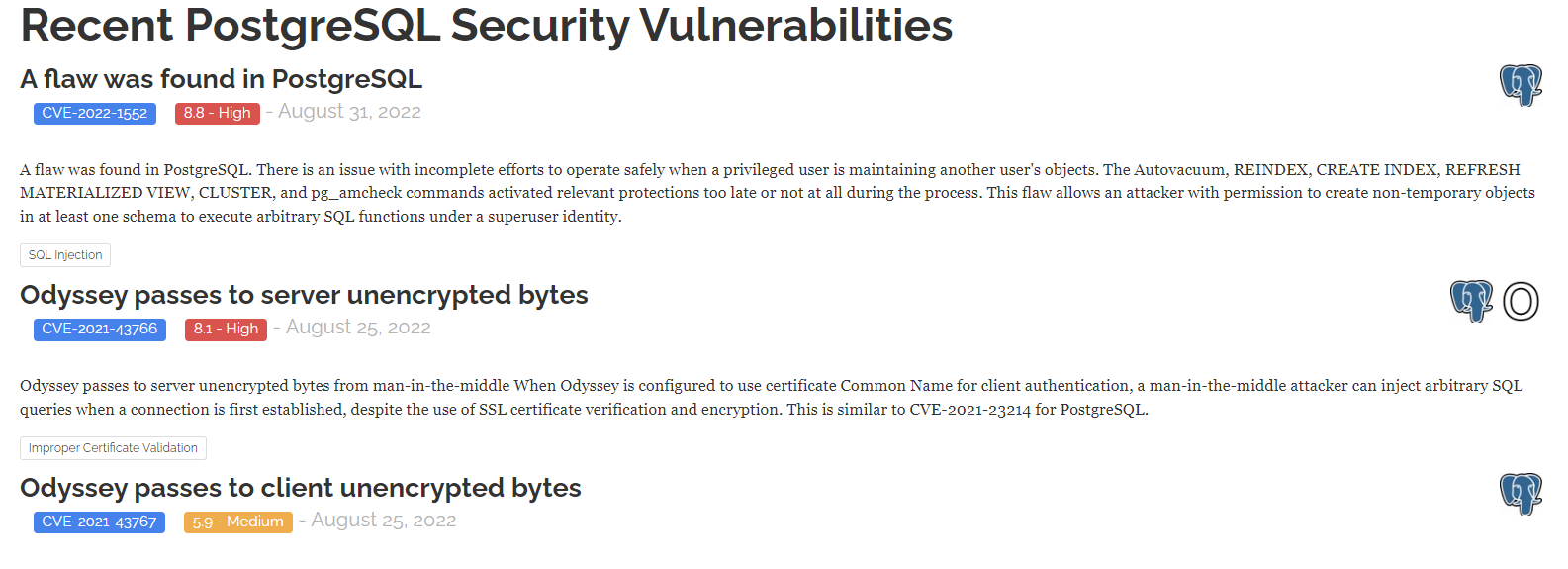
True enough. There ARE recently published vulnerabilities for PostGres (https://stack.watch/product/postgresql/)
Lesson Learned?
By monitoring our network for changes in attack patterns, we can focus on vulnerabilities that are actively being targeted. Patch your PostGres now.
To learn more about Watchdog, visit this : https://futuregen.sg/big-data/whitepaper-reducing-cyber-incidents-by-combatting-hackers-with-legal-revocation-strategy/
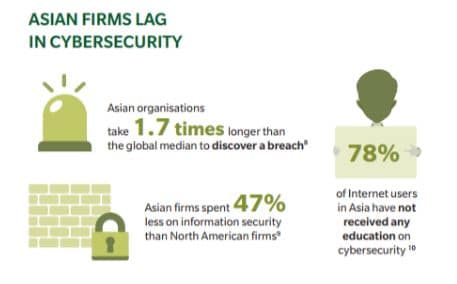
According to a March and McLennan study (Cyber Risk in Asia Pacific), Asian firms take 1.7 times longer to discover a data breach.
In addition, IBM Security and Ponemon Institute computes the average total cost of data breach at USD 141 per lost or stolen record.
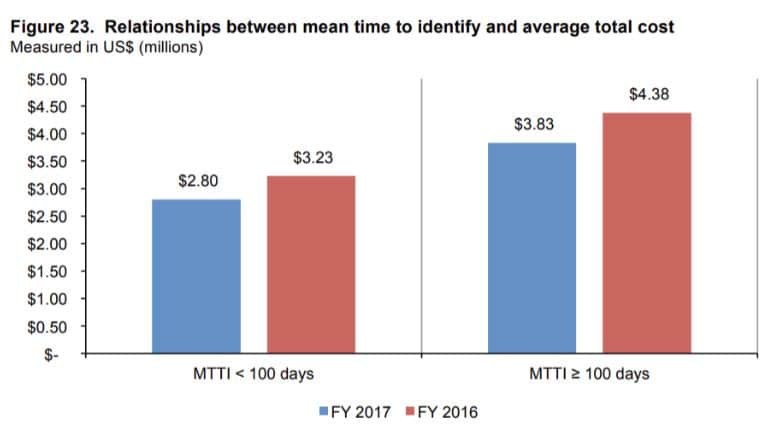
The study also showed a strong relationship between mean time to detection (MTTI) and the cost of each data breach. The good news, if we can call them that, is that the worldwide average breach detection time has improved from 201 days in 2016 to 190 days in 2017.
However, this is still far from the ideal 100 days mean time to breach detection. The graph below shows that the longer a company takes to discover a data breach, the higher the associated cost to contain it later on.
So one key goal of your company’s security framework would be to shorten cyber breach detection times. One common way seasoned network admins do this is via SNMP monitoring of all network and server devices.
Then they also add SIEM capabilities (Security Incident and Events Monitoring). By correlating SNMP, syslog and SIEM data together, it will be easier for network guys to detect breaches in a shorter time.
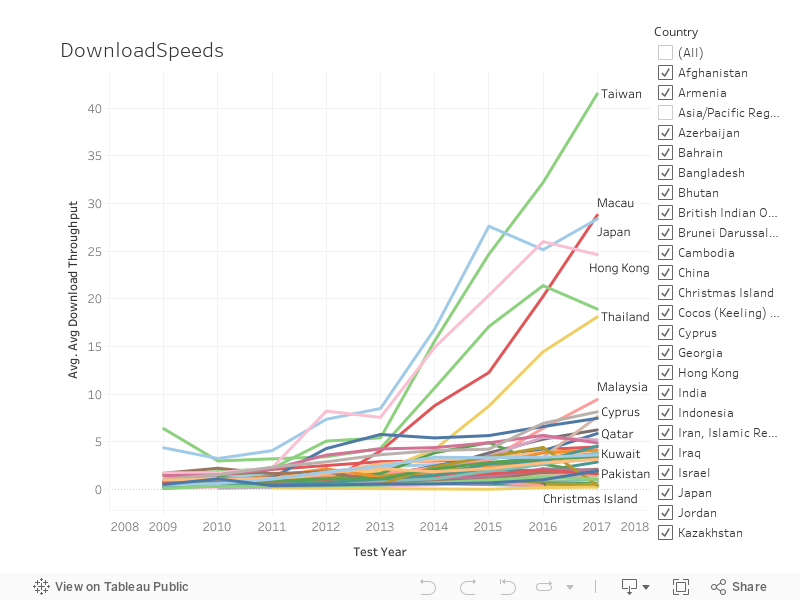
Based on MLab Data 2009 to 2016

Watch Mr Wilson L. Chua present actual cases at the Root Con 2017 event in Tagaytay, Philippines where Big Data Analytics was used to help uncover hacks and attempts.
Cases showcase how descriptive and predictive analytics can be used to help network admins present their analysis in a graphical and more intuitive format – one that helps C-level executives more easily understand and grasp the complex landscape.
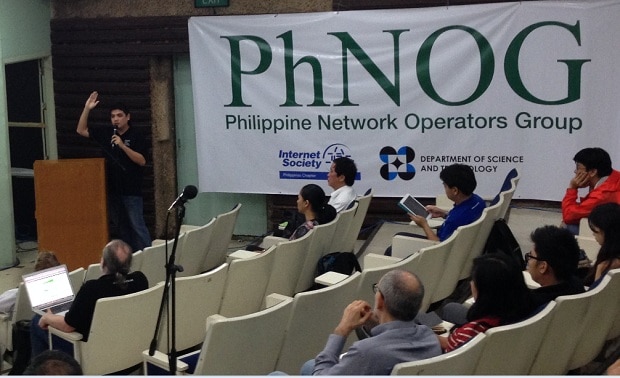
The Department of Science and Technology – Advanced Science and Technology Institute (DOST-ASTI), in partnership with the Philippine Network Operators’ Group (PhNOG), and Trans-Eurasia Information Network (TEIN) Network Cooperation Center (TEIN*CC) will be conducting a one (1)-day Conference with the theme ‘”All over IP’ (AoIP) – touching the different facets of Internet, entwined to our daily lives” on 25 January 2016 at the Marriott Grand Ballroom, Marriott Hotel Manila, Pasay City, Metro Manila.
| 1100 | Big Data Analytics Applied in Network Operations | Wilson Chua |
| 1130 | IXP Next steps (advantages and disadvantages) | Daishi Shima/BBIX |
| 1200 | Lunch break | |
| 130 | Management and Sustainability of the IXP – taking it to the next level – Global Examples / DNSSEC | Jane Coffin/ISOC, Kevin Meynell/ISOC |
| 200 | Internet enabled businesses (challenges/milestones) | Rhett Jones/Rise |
| 230 | CDNs and Internet traffic Analystics | Kam-Sze Yeung/Akamai |
| 300 | Role of a Peering Manager | Jake Chin/Google |
| 330 | Break time | |
| 400 | Network Security | Mon Nunez |
| 430 | Internet BCPs | Amante Alvaran/Brocade |
| 500 | Evolution of the Network Engineer Job Role | Ceejay Dideles |
| 530 | IOT | Benjie Tan |
| 600 | Closing |
Said activity aims to gather participants from the R&D and IT/ICT communities together with the current PhNOG members to discuss the opportunities that can be derived from joining and using the TEIN Network. TEIN is a high speed international research network which provides access to researchers and research institutions within participating countries in Asia and Europe. Through TEIN, international joint research projects pertaining to climate change, remote medical service, remote cultural performances, agriculture, and information technology have been conducted. Local and foreign experts will also share their knowledge and experiences that will enable the continuous development of the Philippine Internet.
On the other hand, Philippines Network Operators Group (PHNOG) is a nonprofit organization established to promote coordination among Network Operators in Philippines. Focus is given to knowledge development of all members as well as the Philippines IT community as a whole through discussions on technical issues/concerns regarding the Internet and network management.
In line with this, we would like to invite you as one of the participants in this one (1)-day activity. Registration for this activity is free. Please take note that the activity only offers limited slots, which will be granted on a first come, first served basis. Deadline for registration is on 15 January 2016. To reserve your seat, kindly register at this link: https://www.apan41manila.com/events/register/xphilippine-network-operators-group-conferenc
Should you have any clarifications, please feel free to contact Mitz Ann N. Montañez at mitz@asti.dost.gov.ph or Marie Antoinette F. Bangabang at meiann@asti.dost.gov.ph. You may also call +63 2 4269760 loc. 1603 / loc.1408.
– See more at: http://www.bnshosting.net/#sthash.plX0krt8.dpuf
Futuregen has been invited to share our server and network security best practices at the Web Developers Conference 2014
on November 18-19, 2014 at the AIM Conference Center, Makati City, Philippines
Learn More: http://www.fmi.com.ph/webdev2014/

People usually think that companies outsource some of their functions to save on money. While this has been true in the early days of outsourcing where companies enjoyed the savings from properly implemented plans, they have also realised some additional benefits from outsourcing. Generally, when either one or more of the following occurs, it is best you consider Outsourcing as a viable option: